
How to use COM Wrapper dll in AX

(i) Install the COM Wrapper DLL Files, into the bin directory of the AOS.
(ii) Register it with the following Command,%WINDIR%\Microsoft.NET\Framework\v2.0.50727\regasm.exe Test.Wrapper.DLL /tlb:Test.Wrapper.tlb
(iii) Now, After Successful Registration, Follow the below path and click on COM Class Wrapper Wizard.i.e., Tools->Development tools->Wizards->COM Class Wrapper Wizard
(iv) On the first Page of the Wizard, Click Next Button
(v) Select the installed Wrapper and then click Next Button.
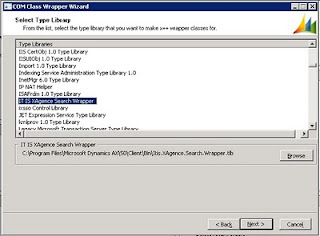
(vi) Then give some string as an element mask and then click finish.


Now, you can see that all the classes created in the wrapper dll will be present in the AOT.
Just directly use those class/classes in your code.

Things to remember while you call this class :
As the Wrapper DLL has been registered in the AOS, So the methods in the extracted classes have to be called from the methods of classes whose run on property is server.

Popular posts from this blog

Mark All for Open Cust Trans and Open Vend Trans

We have situations where there are lots of open transactions that need to be settled against each other. This can be the case if auto settlement is turned off. One solution is to add a "Mark All" button to the custOpenTrans or vendOpenTrans forms. This button "checks" the mark checkbox on every line. The user can then uncheck several lines if needed and Update to settle the lines. The code below is an example of what we used on the open vendor transaction screen. The code is very similar on the AR side. One note: I used vendTable.AccountNum in the code below. That should be generalized to work with any buffer that is passed into the open trans form. void customMarkAll() { VendTransOpen localVendTransOpen; VendTrans localVendTrans; container conSum; int linesProcessed; ; //show wait cursor startLengthyOperation(); element.lock(); //remove all prior markings specOffsetVoucher.deleteSpe...

Print Report in Microsoft Dynamics AX 2009 through X++

I am trying to print sales confirmation report on a button click which I have added on Sales Order Detail form in Microsoft Dynamics AX 2009. On click event of that button, I have written following code: void clicked() {     Args                args;     ReportRun           reportRun;     SalesFormLetter     salesFormLetter;     PrintJobSettings    printJobSettings;     CustConfirmJour     custConfirmJour;     RecordSortedList    list                = new RecordSortedList(55);     SalesTable          salesTableUpdate;     ;     SELEC...

Creating Free Text Invoice through X++ code

Job: Calling class from job to run the class public void freeTextInvoicePostTestJob() { Dialog dialog; DialogField dlgCustAcc; DialogGroup dialogPeriodLengthGroup, dialogPeriodLengthGroup1; DialogField dlgLedgerAcc; ; dialog = new Dialog("Free-Text Invoice"); dialogPeriodLengthGroup1 = dialog.addGroup('Cust Table'); dlgCustAcc = dialog.addField(typeid(CustAccount)); dialogPeriodLengthGroup = dialog.addGroup('Ledger Table'); dlgLedgerAcc = dialog.addField(typeid(LedgerAccount)); if(dialog.run()) { if(dlgCustAcc.value() && dlgLedgerAcc.value() != '') FreeTxtInvoiceCreatePost::main(dlgCustAcc.value(), dlgLedgerAcc.value()); else throw error(strfmt("Either CustAccount or LedgerAccount info is missing.")); } } Class: Which creates the free text invoice class FreeTxtInvoiceCreatePost { } static void main(CustAccount _custAccount, LedgerAccount _ledgerAccount) { CustInvoiceTable custInvoiceTable; ...